
Custom perforated sheet metal based on a photo
When decorating a wall, the photo or image you use is crucial. Not only does it need to be visually appealing, but it must also comply with the photo's copyright. In this article, we will explore " How to choose an appropriate image for pixelation," " Ensuring you have the necessary rights to use the photo," " Which website to use for high-quality royalty-free images," and " Retouching the image to achieve the characteristics that will allow the photo to be properly transformed into perforated sheet metal for facade wall cladding."
How to choose an appropriate image for pixelation on perforated sheet metal
The process of pixelation on perforated sheet metal involves several calculation algorithms that transform the pixels of a photo into holes of varying sizes and shapes on a perforated sheet metal panel, thus defining a large design applied to a facade wall. In order to ensure that your image is accurately represented on the decorative metal sheet, it is crucial to avoid images with too much detail in areas with too many pixels. Excess information will not be recognized when reproduced on perforated sheet metal. The transformation of an image into pixels on perforated sheet metal is based on a scale of 1 hole for every 100 pixels. Be aware of this ratio, which allows you to enlarge a photo onto XXL facade sheet metal, but below a certain threshold, the details will disappear. To ensure optimal results on perforated sheet metal, it is recommended to use source images with large pixel areas, distinct contrasting visuals, and clearly defined contours. Opt for simple shapes and smooth contours, which will make them easier to recognize on the perforated sheet metal and ensure an attractive wall decoration on an XXL facade. A few examples of a tiger's head in perforated sheet metal or wall decoration representing rows of trees can serve as inspiration for your future project.
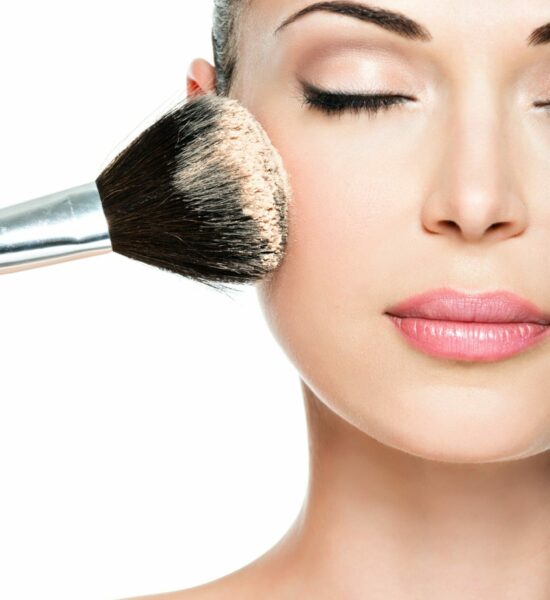
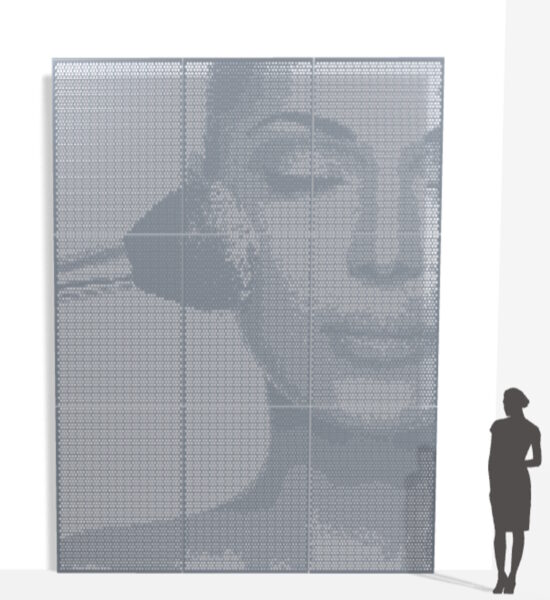
Interpretation of a well-structured source image for transformation into custom perforated sheet metal wall decoration, beautiful color gradient with well-defined visual contours for the cosmetic advertising photo depicting the woman and the brush.

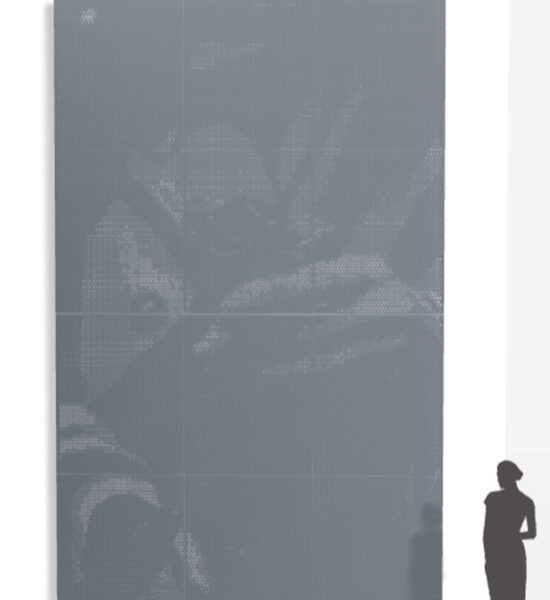
Interpretation of a poorly structured source image for the production of custom perforated sheet metal facade decoration, lack of light contrast, diffuse contours, color without threshold difference, the photo of the woman with the rose is indistinguishable.
It is essential to choose the right source image, otherwise you risk ending up with a very poor visual effect when transforming it into a metal decoration. Thanks to the custom perforated sheet metal configurator, you can test several images for free to assess the quality of the transformation.
Hold the rights to use the image
It is essential to respect the copyright of a photo when using images to customize your perforated metal facade. Using an image without the appropriate permission can result in serious legal consequences. Here are a few ways to obtain the rights to an image:
- Create your own design: If you have the necessary graphic design skills, creating your own image is the surest way to avoid any copyright issues. This guarantees that the image is exclusive to your customization. Starting with a photo of a landscape, you can apply a few photo filters to increase the contrast and brightness of the photo before transforming it into perforated wall decor. You can also hire a freelance service provider for this step, but you must validate the copyright, publication, and reproduction rights for the original image.
- Buy images: Many websites such as iStock, ShutterStock, and Depositphotos offer licensed images that you can purchase for commercial use. Be sure to read the license terms to find out how you can use the image.
- Free licenses: Some artists make their work available under free licenses that allow free use, including for commercial purposes. Creative Commons licenses are one example. You can find these images on sites such as Unsplash, Pexels, Pixabay, and Freepik.
The issue of image rights is often overlooked, but it is essential to consider this before embarking on a perforated metal facade project.
Image editing
When the source image does not display correctly on the perforated sheet metal presented in the configurator, it is best to have the image retouched by a specialized external service provider. Image retouching is essential to simplify and visually adapt your custom-cut sheet metal facade so that it can be easily integrated into the configurator. A graphic design professional will adjust the contrast and brightness levels and make targeted modifications to perfectly adapt the image to the process of transforming the photo into a perforation. This approach optimizes the visualization in the configurator and also ensures a high-quality final result for the perforated metal wall decoration.
Here are the steps to improve the contrast and brightness of an image. You can try following these simple steps yourself for easy editing using photo editing software such as Adobe Photoshop, GIMP, or Lightroom.
- Step 1 – Adjust the levels: In the levels or brightness/contrast tab, adjust the sliders to extend the brightness range of the image. Move the dark tones slider to the right to darken the dark areas and increase the contrast, then move the light tones slider to the left to lighten the bright areas. If you have to focus on just one step, this is the one. Adjusting the levels on a photo will give the best performance when moving from a pixel to a perforation.
- Step 2 – Adjust the tone curve: In photo editing software such as Photoshop, you can adjust the tone curve for greater control over the image. Create an S-shaped curve by pulling the top right corner slightly upward and the bottom left corner slightly downward. This increases the contrast in the drawing and adds brightness to the highlights and shadow areas.
- Step 3 – Increase the brightness of the illustration: Use the brightness tool to lighten the dark areas of the image without losing detail. Be careful not to overexpose the bright areas, otherwise you will lose precision when transforming the image into a decorative perforation.
These first three steps are accessible to amateurs, even those without much knowledge of photo editing software. Save and export as soon as you have finished editing, saving your image in .jpeg or .png format with a size between 500 KB and 5 MB.
For the next step, you need more experience and practice.
- Step 4 – Enhance local contrast: Use tools such as the density brush or contrast filter to selectively adjust the contrast on certain parts of the image, such as shadows or highlights. You can measure the impact of your editing directly on the custom perforated sheet metal configurator.
- Step 5 – Use layers: adjustment layers allow you to apply changes non-destructively. This allows you to go back and change the adjustments at any time, so feel free to save multiple versions as you experiment.
- Step 6 – Make fine adjustments: Once you are satisfied with the overall contrast and brightness, make fine adjustments to your photo to refine the overall appearance of the image. This may include balancing colors, reducing noise, or adjusting sharpness. Be careful not to spend too much time on the details! Think big picture, remember that the pixel disappears in favor of cutting a hole 100 times larger. Your image becomes a wall decoration measuring tens or even hundreds of square meters! So don't overdo the quality, don't add too much detail that won't be noticeable on a large scale.
By following these steps in order, you should be able to improve the contrast and brightness of your image to achieve a more dynamic and appealing result. Ultimate tip for editing your photo: if you don't get the desired effect after several attempts, then change the source photo! With poor source material, it's impossible to work miracles. Be open to change for a better result.